
How I built offline search for my static Hugo site
Ever wondered what it takes to build a fully offline search, with no server at all? In this article I show how I built one for my blog using Hugo and Lunr.js!
This blog started as an experiment with one goal: cost nothing at the end of the month.
That’s why I decided to build a static site with a generator called Hugo. That means there’s no backend for the blog; there’s no Client/Server architecture, only the client, and all of the site’s content is pre-rendered.
But that doesn’t mean it has to be short on features. Not having a server is no reason the site can’t have content search.
So the question was how to build offline search for the blog.
Research
After a bit of digging I found a documentation page on the Hugo site describing the main strategies for adding search to a Hugo blog.
These tools vary a lot in complexity and in how they approach the problem. Some give you a search feature that’s almost ready to go, while others only generate an index file that specialized tools can search.
I picked an approach that I thought was both flexible and would teach me the most.
So I decided to use a tool called Lunr.js (pronounced ‘lunar’).
Lunr.js

Lunr.js is a tool that lets you search pre-built indexes. It has several other nice traits:
- No dependencies
- Runs directly in the browser
- Extensible through plugins
- Easy to use
Fun fact: the tool is inspired by an Apache project called Solr.
It only takes three steps to search with Lunr.js. The first is to create an array of objects holding the searchable information:
var posts = [{
"uri": "/posts/arquitetura-gritante",
"title": "Arquitetura Gritante",
"metadescription": "descrição para o Google",
"content": "Um dos meus capítulos preferidos do livro Arquitetura Limpa...",
"tags": ["arquitetura gritante", "arquitetura limpa", "SOLID", "SRP"]
}, {
"uri": "/posts/continuous-delivery-blog-com-hugo",
"title": "Entrega contínua de blogs Hugo com GitHub Actions",
"metadescription": "descrição para o Google",
"content": "O [Hugo](https://gohugo.io) é hoje um dos...",
"tags": ["hugo", "continuous delivery", "github actions"]
}, {
"uri": "/posts/pattern-matching-csharp",
"title": "Pattern matching no C# 8.0",
"metadescription": "descrição para o Google",
"content": "A partir do C# 7.0 a linguagem começou a receber...",
"tags": ["csharp", "pattern matching", "type matching"]
}];
With that data in hand, we can use Lunr.js to build a search index:
var idx = lunr(function () {
this.ref('uri'); // this is the field that identifies the post in the results
this.field('title');
this.field('content');
this.field('tags');

posts.forEach(function (doc) {
  this.add(doc);
}, this);
});
And with the index built, it’s just a matter of running the search:
var results = idx.search("pattern matching");Fine, but if building the index requires an array (in JavaScript) with the posts’ information (which, by the way, Hugo doesn’t generate), then the first step is to find a way to generate that information.
I’d need some kind of extractor: a tool that reads the blog’s content and exports a JSON file with the information needed from each post.
That’s where hugo-lunr comes in.
Hugo Lunr
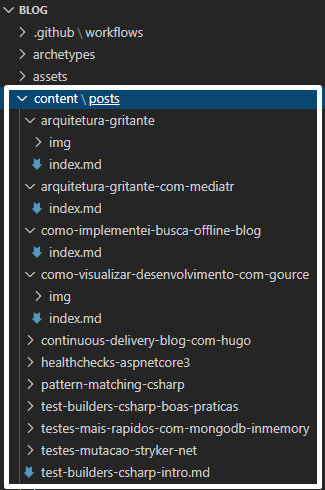
Hugo-lunr is a NodeJS tool that does exactly that: it reads every markdown file (.md) under /content/posts and parses it to build the dataset for Lunr.js index generation.
For context, the blog’s content is structured like this:
The plan
After studying Lunr.js a bit and running a test with Hugo-lunr, I was convinced this solution could give me a good result.
So the plan was to implement the following:
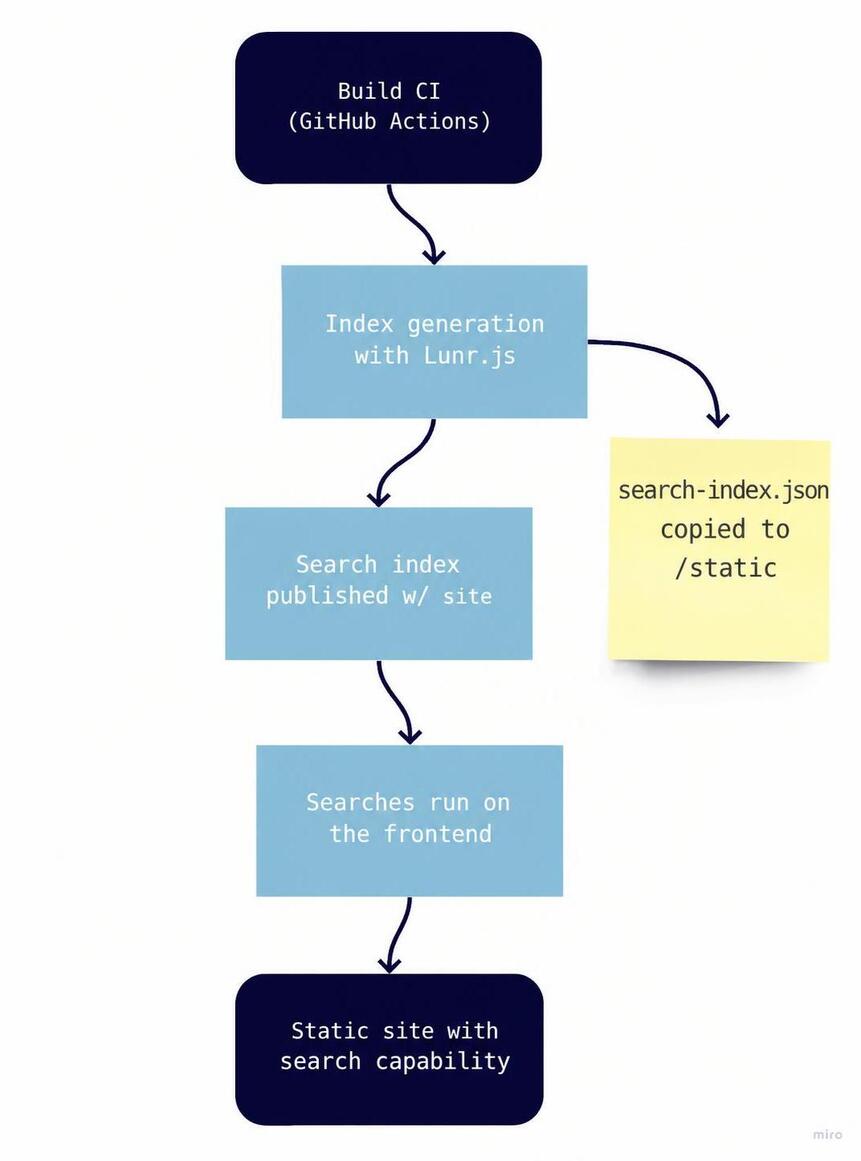
It was just a matter of generating the files in the /static folder so Hugo would automatically include them when publishing the site, and then using them from JavaScript. Very simple.
But of course there would be surprises.
The challenges
The first problem I ran into was with Hugo-lunr, and it was partly due to how I had set up publishing.
To schedule a post, I set a future publish date, and the continuous delivery process on GitHub Actions is configured to run every day at 8 AM. Since Hugo doesn’t include future-dated posts by default, on the day the post’s date stops being in the future, it’s automatically included in the build. Not before.
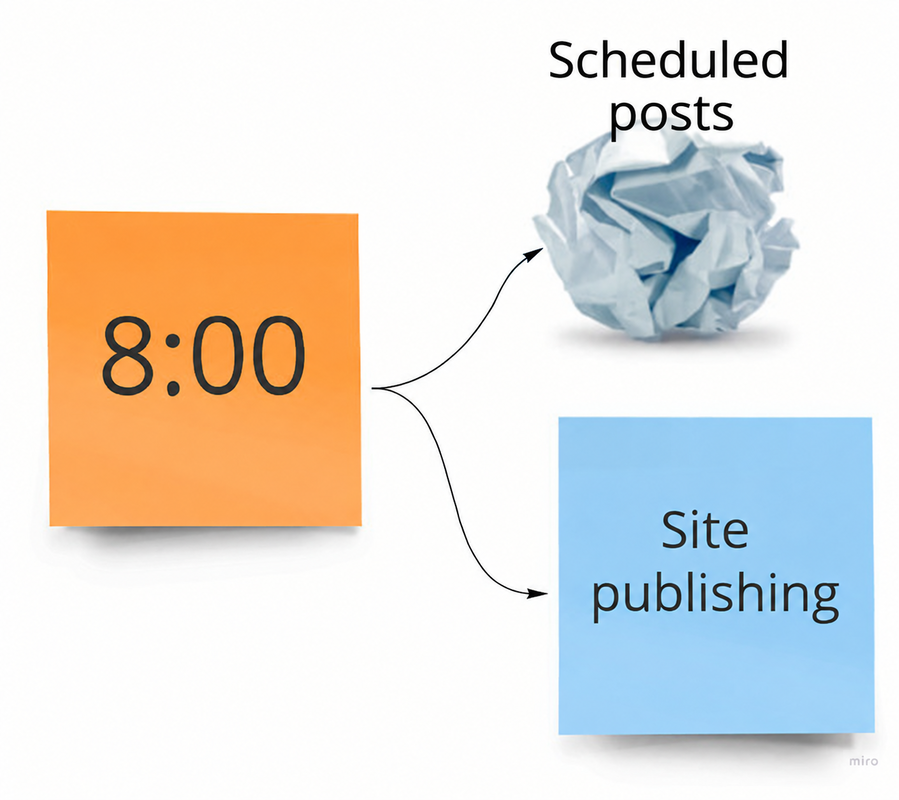
And Hugo-lunr didn’t support this behavior.
So I had to create a fork of the repository. I added a new parameter to filter out future posts, alongside the existing drafts filter, and opened a Pull Request.
Only a week later did I realize the repository was abandoned, with pull requests unanswered since 2016. New needs soon showed up, so I decided to stick with the fork and change it as needed.
The metadata
Right after successfully publishing the first version of the blog with the index JSON, I started building the long-awaited search system.
It didn’t take long to discover one more missing piece of the puzzle: the index file doesn’t keep the dataset’s content, so the only information returned was the post’s uri. Unfortunately, that wasn’t enough to build a results page. I needed metadata.
So I added a routine to generate a smaller dataset to ship alongside the index. This JSON is very similar to the original dataset, but holds only the essentials needed to build a halfway decent view:
var posts = [{
"uri": "/posts/arquitetura-gritante",
"title": "Arquitetura Gritante",
"metadescription": "Já ouviu falar em Arquitetura Gritante? Neste artigo exploramos o que torna gritante a arquitetura de uma aplicação, e como isso pode beneficiar um projeto de software."
}
// ...
];
In the end, the file generation script turned out reasonably simple:
var fs = require('fs');
var lunr = require("lunr")
require("lunr-languages/lunr.stemmer.support")(lunr)
require("lunr-languages/lunr.pt")(lunr)

function createSearchIndex() {
// search-data.json is the dataset generated by my Hugo-lunr fork
fs.readFile('./search-data.json', 'utf8', function(err, data) {
    if (err)
      throw err;

    // this is where the index is built
    const jsonData = JSON.parse(data)
    const idx = lunr(function () {
      this.use(lunr.pt)
      this.ref('uri')
      this.field('title', { 'boost': 1.5 })
      this.field('tags', { 'boost': 1.2 })
      this.field('content')
      this.field('metadescription')

      jsonData.forEach(doc => {
        this.add(doc)
      }, this)
    })

    // the index is saved as JSON to be published along with the site
    const serializedIndex = JSON.stringify(idx)
    fs.writeFile('./search-index.json', serializedIndex, 'utf-8', function(err) {
      if (err)
        throw err;
    })

    // the 'data companion' is basically a view model for building the results view
    const dataCompanion = jsonData.map((doc) => {
      return {
        'uri': doc.uri,
        'completeUri': `/posts${doc.uri}`.replace(/\/index$/, ""),
        'title': doc.title,
        'metadescription': doc.metadescription
      };
    })
    // the 'data companion' is also saved as JSON to be published along with the site
    fs.writeFile('./search-data-companion.json', JSON.stringify(dataCompanion), 'utf-8', function(err) {
      if (err)
        throw err;
    })
  })
}
The frontend
Once the files were being generated, I had to build the frontend that would consume this data.
I created a JavaScript file with a few helper functions to load the data and run searches:
function loadSearchData() {
return fetch('/search-data-companion.json')
  .then(response => response.json())
  .then(data => {
    window.searchData = data;
    return data;
  });
}

function loadSearchIndex() {
return fetch('/search-index.json')
  .then(response => response.json())
  .then(data => {
    window.searchIndex = lunr.Index.load(data);
    return window.searchIndex;
  });
}

function performSearch(query) {
if (!window.searchIndex) {
  console.error('Search index not loaded');
  return [];
}

const results = window.searchIndex.search(query);
return results.map(result => {
  const post = window.searchData.find(post => post.uri === result.ref);
  return {
    ...post,
    score: result.score
  };
});
}
I also built a simple search interface:
function initializeSearch() {
const searchInput = document.getElementById('search-input');
const searchResults = document.getElementById('search-results');

searchInput.addEventListener('input', function(e) {
  const query = e.target.value.trim();

  if (query.length < 2) {
    searchResults.innerHTML = '';
    return;
  }

  const results = performSearch(query);
  displayResults(results, searchResults);
});
}

function displayResults(results, container) {
if (results.length === 0) {
  container.innerHTML = '<p>Nenhum resultado encontrado.</p>';
  return;
}

const html = results.map(result => `
  <div class="search-result">
    <h3><a href="${result.completeUri}">${result.title}</a></h3>
    <p>${result.metadescription}</p>
  </div>
`).join('');

container.innerHTML = html;
}
The result
The end result was a fully offline search system that works really well for a blog this size. Search is fast and the results are relevant.
A few improvements I added later:
- Portuguese support: I added the
lunr-languagesplugin to improve search in Portuguese - Field boosting: I gave titles and tags more weight in the results
- Debounce: I added a short delay to avoid firing too many searches while the user types
- Highlight: I implemented highlighting of the matched terms in the results
The whole system runs without a server, it’s fast, and it gives the blog’s visitors a good search experience.
Conclusion
Building offline search for a static site isn’t as complicated as it looks. With the right tools (Hugo, Lunr.js, and a bit of JavaScript), you can build a robust, efficient feature.
The biggest challenge was figuring out how to fit all the pieces together, but once the system is up and running, maintenance is minimal. Every time I publish a new post, the index is updated automatically during the build.
This solution can be adapted to other static site generators and is an excellent option for anyone who wants to add search without depending on external services or complex backends.