
How can MediatR help my project?
In this article, I show how the MediatR library works, and also ways it can help structure our applications around the business.
MediatR is an unambitious library, built to solve a very specific problem: within a single process, how do you decouple sending messages from handling them? And MediatR does it simply and elegantly.
MediatR
The library was created by Jimmy Bogard, the same author behind AutoMapper, and it’s currently on its fifth version. A nice touch is that the library has no dependencies.
Requests and Handlers
What I like most about MediatR is how easy it makes moving all the business logic out of the presentation layer and into the application layer.
For example, imagine a microservice with an add item to cart feature. In this case, we can picture an endpoint like this one:
public class CarrinhoComprasController : ControllerBase
{
  private readonly IMediator _mediator;

  // NOTE THAT THE MEDIATOR IS INJECTED IN THE CONSTRUCTOR.
  // PRETTY STANDARD IN ASP.NET Core.
  public CarrinhoComprasController(IMediator mediator)
  {
      _mediator = mediator;
  }

  [HttpGet]
  public async Task<ProdutosViewModel> AdicionarItemNoCarrinho(
      [FromBody]AdicionarItemCarrinhoRequest request)
  {
      return await _mediator.Send(request); // HERE, WE DISPATCH A REQUEST TO THE MEDIATOR
  }
}
As the name implies, MediatR is a mediator, meaning it will route the Request to any interested Handlers. Now let’s look at the definition of a MediatR Request:
public class AdicionarItemCarrinhoRequest : IRequest<ItemAdicionadoCarrinhoViewModel>
{
  public string IdProduto { get; set; }
  public string Referrer { get; set; }
}

public class ItemAdicionadoCarrinhoViewModel
{
  public Guid IdItemCarrinho { get; set; }
}
In the snippet above, we can see that AdicionarItemCarrinhoRequest is an IRequest. This is a MediatR interface that simply binds input and output into a contract. In other words, AdicionarItemCarrinhoRequest is a request that must return an ItemAdicionadoCarrinhoViewModel.
A handler, in turn, looks like this:
public class AdicionarItemCarrinhoRequestHandler
  : IRequestHandler<AdicionarItemCarrinhoRequest, ItemAdicionadoCarrinhoViewModel>
{
  public async Task<ItemAdicionadoCarrinhoViewModel> Handle(AdicionarItemCarrinhoRequest request, CancellationToken cancellationToken)
  {
      // the use case's business logic for listing the products goes here
      // the return below is just to keep the example simple
      return await Task.FromResult(new ItemAdicionadoCarrinhoViewModel
      {
          IdItemCarrinho = Guid.NewGuid()
      });
  }
}
Finally, to enable MediatR in an ASP.NET Core project using the default dependency injection container, just do this in Startup.cs:
public void ConfigureServices(IServiceCollection services)
{
services.AddMvc();

// the type passed here is from the assembly where the Requests and Handlers live
services.AddMediatR(typeof(Startup));
}
The MediatR wiki has configuration examples for all the most popular containers.
Behaviours
As our applications grow, so does the need for more instrumentation. Standardized logs across all requests, more uniform exception handling, performance measurement, and metrics generation are just a few examples of cross-cutting concerns that become increasingly necessary.
Behaviours let us abstract exactly that part. They work much like ASP.NET Core Middlewares. Below is an example that logs the payload of any Request when the log level is Debug:
public class RequestPayloadLoggingBehaviour<TRequest, TResponse> : IPipelineBehavior<TRequest, TResponse>
{
  private readonly ILogger _logger;

  public RequestPayloadLoggingBehaviour(
      ILogger<RequestPayloadLoggingBehaviour<TRequest, TResponse>> logger)
  {
      _logger = logger;
  }

  public async Task<TResponse> Handle(TRequest request, CancellationToken cancellationToken,
      RequestHandlerDelegate<TResponse> next)
  {
      if (_logger.IsEnabled(LogLevel.Debug))
      {
          var requestName = typeof(TRequest).Name;
          var stringPayload = JsonConvert.SerializeObject(request);
          _logger.LogDebug($"New request with payload of {requestName} as {stringPayload}");
      }

      return await next(); // RUNS THE NEXT BEHAVIOUR OR HANDLER
  }
}
Another very useful example, and one I often use in my projects, is a Behaviour that validates the Request with FluentValidation before sending it to the Handlers:
public class RequestValidationBehavior<TRequest, TResponse> : IPipelineBehavior<TRequest, TResponse>
  where TRequest : IRequest<TResponse>
{
  // Validators registered for a given request
  private readonly IEnumerable<IValidator<TRequest>> _validators;

  public RequestValidationBehavior(IEnumerable<IValidator<TRequest>> validators)
  {
      _validators = validators;
  }

  public Task<TResponse> Handle(TRequest request, CancellationToken cancellationToken,
      RequestHandlerDelegate<TResponse> next)
  {
      if (_validators.Any())
      {
          var context = new ValidationContext(request);

          var failures = _validators
              .Select(v => v.Validate(context))
              .SelectMany(result => result.Errors)
              .Where(f => f != null)
              .ToList();

          if (failures.Count != 0)
          {
              // ABORTS THE PROCESS IF THE REQUEST IS NOT VALID
              throw new ValidationException(failures);
          }
      }

      // RUNS THE NEXT BEHAVIOUR OR HANDLER WITH A VALID REQUEST
      return next();
  }
}
This Behaviour ensures that only valid Requests move on to processing. Finally, let’s look at a basic benchmark example:
public class BenchmarkBehavior<TRequest, TResponse> : IPipelineBehavior<TRequest, TResponse>
  where TRequest : IRequest<TResponse>
{
  private readonly ILogger _logger;

  public BenchmarkBehavior(ILogger<BenchmarkBehavior<TRequest, TResponse>> logger)
  {
      _logger = logger;
  }

  public Task<TResponse> Handle(TRequest request, CancellationToken cancellationToken,
      RequestHandlerDelegate<TResponse> next)
  {
      var stopwatch = new Stopwatch();
      stopwatch.Start();

      // NOTE THAT THE HANDLER RUNS HERE IN THE MIDDLE
      var response = next();

      stopwatch.Stop();
      _logger.LogInformation($"Request {request.GetType().Name} took {stopwatch.Elapsed}");

      return response;
  }
}
The figure below shows the order in which behaviours are executed. Each Behaviour gets the chance to run logic before and after the next one executes.
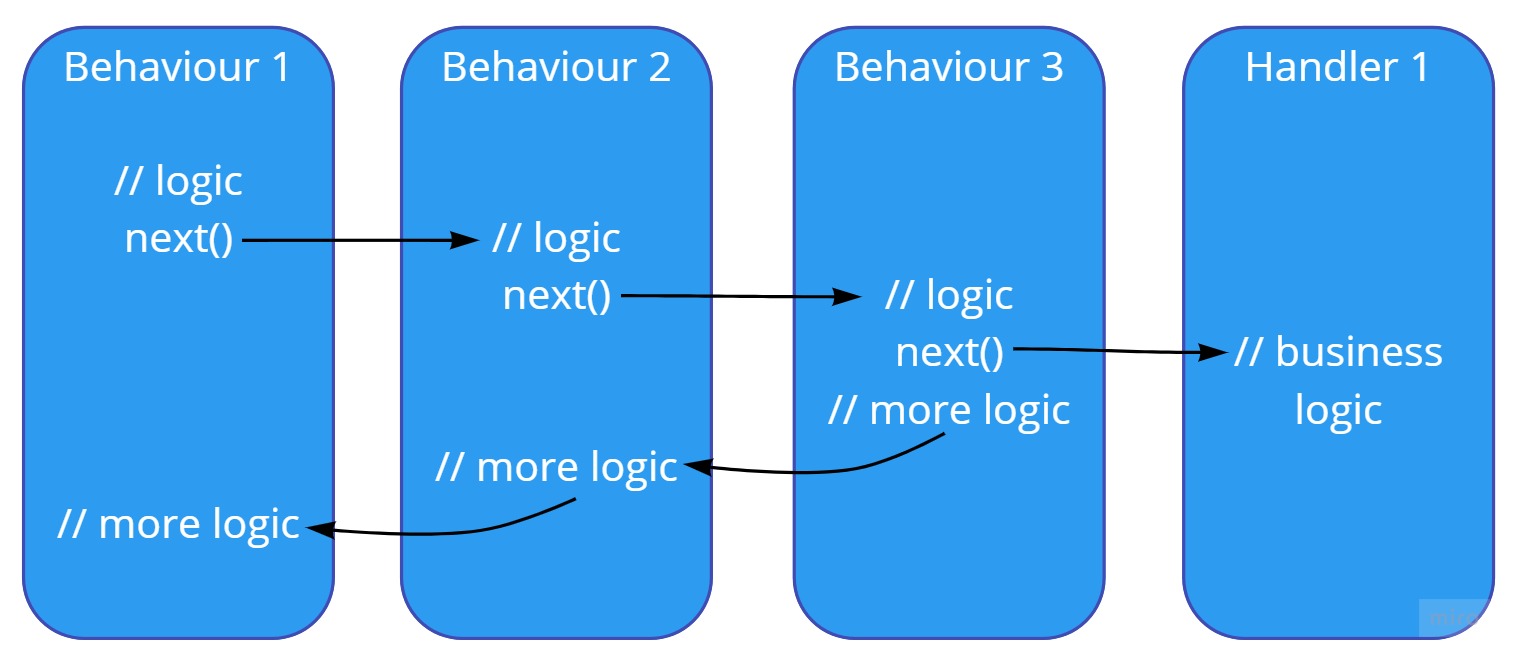
The execution order of Behaviours is determined when they’re registered in the dependency injection container:
cfg.For(typeof(IPipelineBehavior<,>)).Add(typeof(OuterBehavior<,>));
cfg.For(typeof(IPipelineBehavior<,>)).Add(typeof(InnerBehavior<,>));
cfg.For(typeof(IPipelineBehavior<,>)).Add(typeof(ConstrainedBehavior<,>));
Tests
Tests are another area that benefits a lot from using MediatR. A unit or integration test can be as simple as this one:
[Fact]
public async Task Deve_adicionar_o_produto_123_no_carrinho()
{
  // ARRANGE
  var request = new AdicionarItemCarrinhoRequest
  {
      IdProduto = "123",
      Referrer = "062d516d-356f-45be-a63c-d723e752d6f0"
  };

  // ACT
  var viewModel = await new AdicionarItemCarrinhoRequestHandler(logger)
      .Handle(request, CancellationToken.None);

  // ASSERT
  viewModel.IdItemCarrinho.Should().NotBe(Guid.Empty);
  // other asserts
}
Style matters
One way to make Request code easier to navigate and read is to keep the Request and its Handler in the same file. One option is to do it like this:
public class AdicionarItemCarrinhoRequest : IRequest<ItemAdicionadoCarrinhoViewModel>
{
  public string IdProduto { get; set; }
  public string Referrer { get; set; }
}

public class AdicionarItemCarrinhoRequestHandler
  : IRequestHandler<AdicionarItemCarrinhoRequest, ItemAdicionadoCarrinhoViewModel>
{
  public async Task<ItemAdicionadoCarrinhoViewModel> Handle(AdicionarItemCarrinhoRequest request, CancellationToken cancellationToken)
  {
      // ...
  }
}
But I think it’s even better to nest the Handler inside the Request class. That tip came from Jimmy Bogard himself in one of his talks:
public class AdicionarItemCarrinhoRequest : IRequest<ItemAdicionadoCarrinhoViewModel>
{
  public string IdProduto { get; set; }
  public string Referrer { get; set; }

  public class AdicionarItemCarrinhoRequestHandler
      : IRequestHandler<AdicionarItemCarrinhoRequest, ItemAdicionadoCarrinhoViewModel>
  {
      public async Task<ItemAdicionadoCarrinhoViewModel> Handle(AdicionarItemCarrinhoRequest request, CancellationToken cancellationToken)
      {
          // ...
      }
  }
}
This way, we can quickly see what the Request consists of (its parameters) and how it will be processed (the handler).
A few thoughts
Microservices can vary a lot in complexity and sophistication. By definition, the idea is for them to be small; but their small size doesn’t spare them from dealing with the many aspects of life in a microservices ecosystem.
That’s exactly why a microservice often needs to talk to others to get its job done. These communications mostly fall into two categories: synchronous calls using some RPC (Remote Procedure Call) technology such as REST, Thrift, or gRPC, or asynchronous ones, using a broker like RabbitMQ or Amazon SNS.
And nothing stops the same service from exposing REST and gRPC endpoints while also consuming messages from a broker. In that case, it’s always worth being able to process business rules in a standardized way, regardless of the trigger. And for that, MediatR fits like a glove.
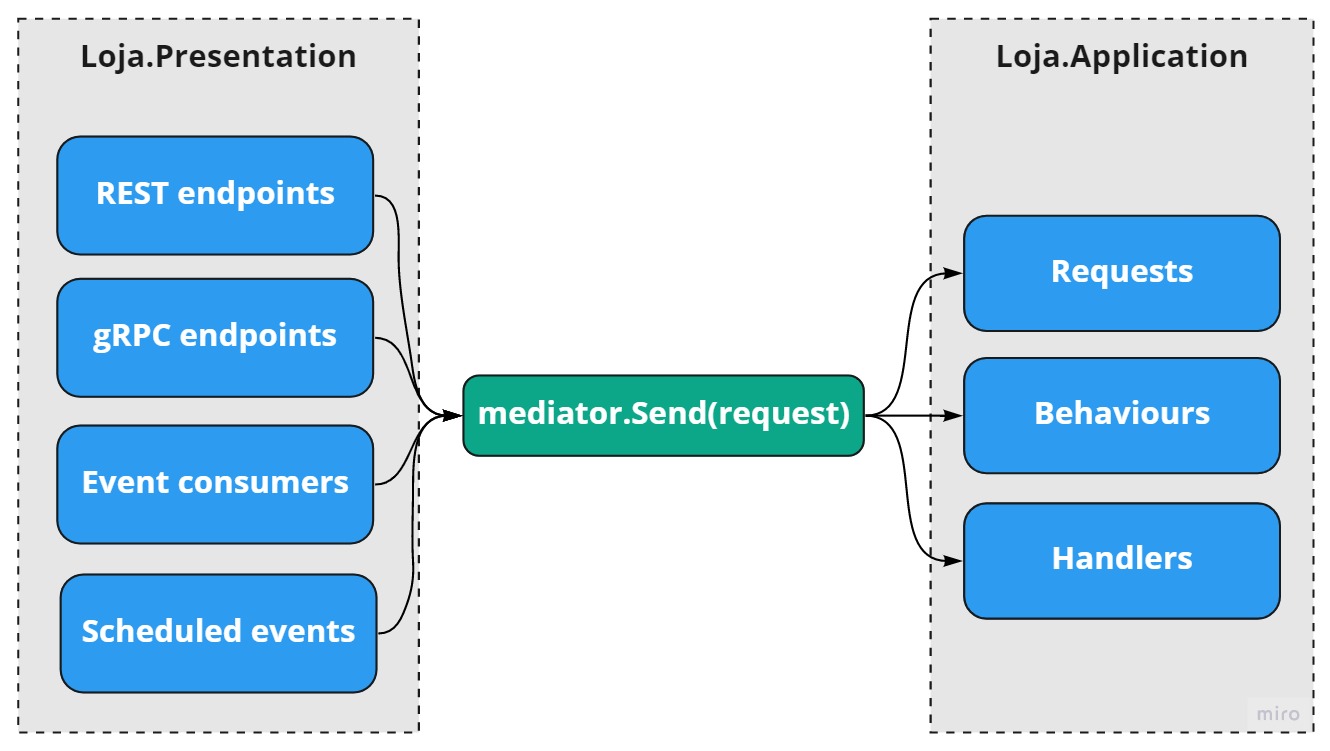
The diagram above shows a scenario where MediatR Behaviours end up having a big advantage over ASP.NET Core middlewares, because they support any kind of service input, from the most common ones natively supported by ASP.NET Core to the most exotic in-house ones.