
Screaming Architecture with MediatR
In this article, I show a way to apply the concept of Screaming Architecture to our applications using MediatR, in order to highlight business value.
In previous articles, I wrote about the concept of Screaming Architecture and about the MediatR library. In this article I’ll show how we can use MediatR to put the concepts of Screaming Architecture into practice, resulting in an application layer that’s more focused on business operations.
Application structure
One application structure I’ve been trying out and really liking is based on the model presented by Jason Taylor at NDC Sydney 2019, which applies Clean Architecture to an ASP.NET Core project. By the way, I’ll soon write a post about Clean Architecture here on the blog.
The structure of the solution, as we’re using it in some projects at Ambev Tech, is the following:
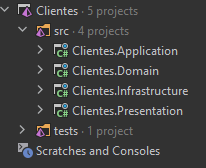
In this structure, the Application layer is responsible for the business operations the application supports, and maps the use cases it implements. It works together with the Domain to carry out the necessary operations, and its focus is generating business value for the customer. Below, we can see how the Application project is organized:
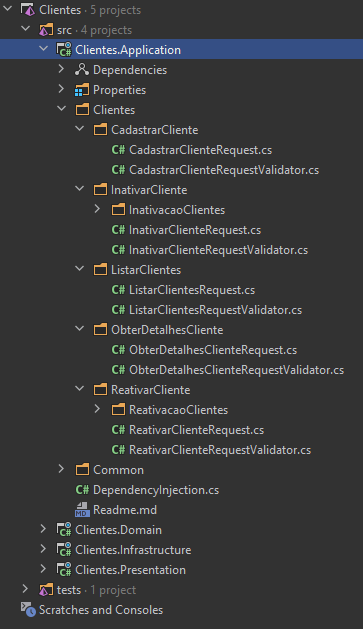
Next, let’s explore how this structure highlights the business operations.
First folder level - Affected entities
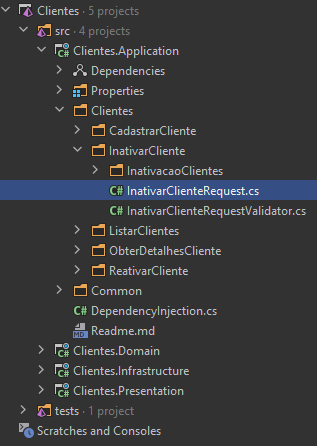
As we can see, the first-level folders identify the entities that will be affected. Usually, these folders end up being a direct mapping of the domain entities. Examples are Clientes (Customers), Pedidos (Orders), CarrinhoCompras (ShoppingCart), etc.
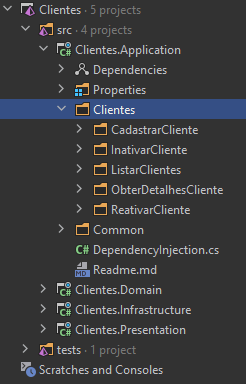
The only exception, as you can see, is the Common folder, which holds the Application project’s own infrastructure, such as FluentValidation configuration and the like.
Second folder level - Business operations
The second-level folders, in turn, describe the business operations the application offers. These operations tend to map very well to Use Cases, as discussed in the article on Screaming Architecture, because they’re described from the point of view of the application’s user. Whether the user is a person or another service, the operations here are described from the user’s point of view. They’re small services the application provides.
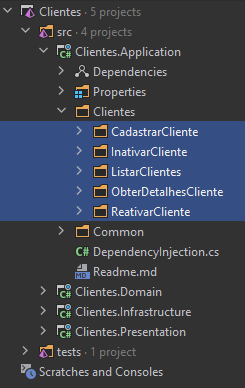
This idea of slicing the application by business operations also ties in with a concept called Vertical Slicing, explored in this talk by Jimmy Bogard at NDC Sydney 2018.
Third level - Implementing the business operations
Everything inside a second-level folder is about carrying out that business operation. As we can see in the following image, we have a MediatR Request, a validation for that request using FluentValidation, and another namespace with other classes needed to carry out the operation.
If you want to see what one of these MediatR requests looks like, check out my article about it.
Conclusion
Following this structure, the first- and second-level directories of the Application project start expressing business value. They’re a map of everything the application is responsible for doing, and of which entities those operations affect.
The biggest advantage of this approach is the clarity it brings. Everything the application does, and also what it doesn’t do, becomes obvious at a quick glance. Just like an apartment floor plan, it’s all right there. The application screams what it does, and its value is immediately obvious.