
Generating UML Diagrams Programmatically with yUML and Python
In this article, I briefly introduce the yUML tool and show how to use it together with Python scripts to generate a use case diagram from an application's structure.
In this quick article, I want to give a brief introduction to yUML and show how we can use it to generate UML diagrams for a project’s documentation. All of it programmatically, so the documentation reflects what the code actually looks like.
yUML
yUML is a tool for generating UML diagrams as sketches. It doesn’t aim to be the ultimate diagramming tool, just to make it easy to create a few kinds of diagrams. It’s very handy for UML-as-sketch diagrams.
The tool is available as a service or as an on-premise install. With the service’s free plan, you get a namespace that lets you save up to 5 diagrams. As an example, mine is https://yuml.me/dyegomaas/diagrams.
But if you don’t need your diagrams saved in the cloud, you can generate them through the API and download them right after. That’s the approach we’ll explore further down.
To create our diagrams, we use DSLs (Domain Specific Languages) designed specifically to describe them. Three kinds of diagrams are supported:
- Class diagrams
- Use case diagrams
- Activity diagrams
Examples
I won’t go into the details of the DSLs, since they’re easy to find in the yUML documentation, but I’ll list a few examples taken from the yUML site itself.
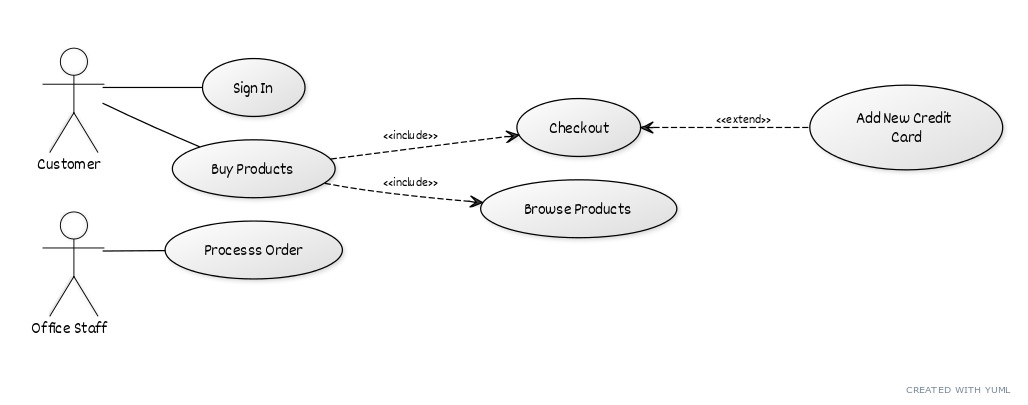
Use case diagram
A use case diagram defined like this:
[Customer]-(Sign In)
[Customer]-(Buy Products)
(Buy Products)>(Browse Products)
(Buy Products)>(Checkout)
(Checkout)<(Add New Credit Card)
(Checkout)
[Office Staff]-(Processs Order)
Generates the following diagram:
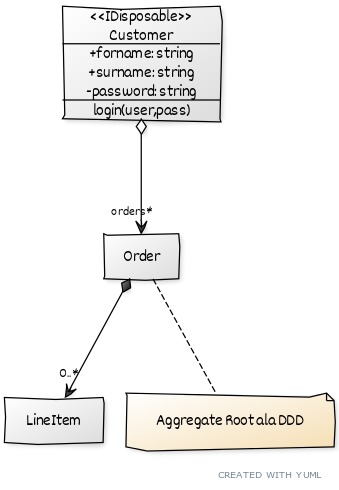
Class diagram
A use case diagram defined like this:
// Cool Class Diagram
// ------------------

// Chain elements like this
[Customer]<>-orders*>[Order]++-0..*>[LineItem]

// Add notes
[Order]-[note: Aggregate Root ala DDD{bg:wheat}]

// Add more detail
[≪IDisposable≫;Customer|+forname: string;+surname: string;-password: string|login(user,pass)]
Generates a diagram like this one:
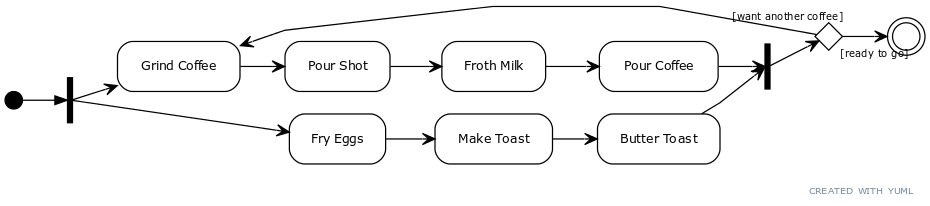
Activity diagram
An activity diagram defined like this:
(start)-|a|
|a|->(Grind Coffee)->(Pour Shot)->(Froth Milk)->(Pour Coffee)->|b|
|a|->(Fry Eggs)->(Make Toast)->(Butter Toast)->|b|
|b|-><c>[want another coffee]->(Grind Coffee)
<c>[ready to go]->(end)
Generates this diagram:
Generating a use case diagram with yUML
The simplest way to generate a use case diagram is through a REST request. Just send a POST to https://yuml.me/diagram/scruffy/usecase/ with a body in the following format:
{
  "dsl_text": "[Usuario]-(ObterFilial),[Usuario]-(PersistirFilial)"
}
This request returns the name of the generated file. In my case, it returned b55a8893.svg, as you can see in the image below:
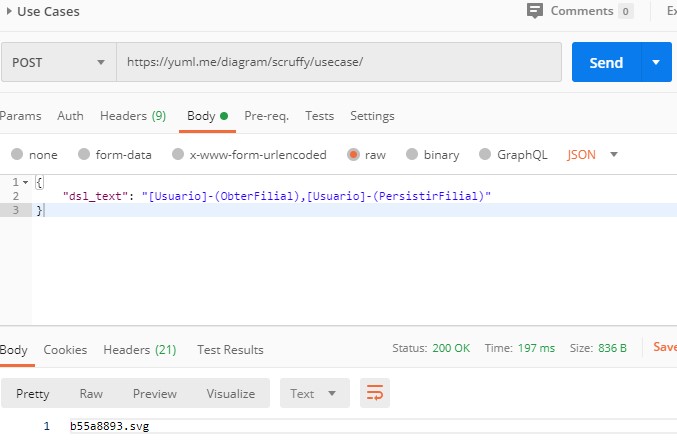
The generated file’s code is b55a8893, and with it we can download the generated diagram with a GET to https://yuml.me/b55a8893.png. Notice that I changed the extension. You can download it as .svg, .png, .jpg, .svg, and .pdf just by changing the extension.
In the next section, I show a very simple example where I used Python to generate a use case diagram.
Generating diagrams with yUML and Python
For the sake of experimentation, I’ll use an example from my other article about screaming architecture, but there are countless situations where this approach can come in handy.
Next, we’ll generate a use case diagram, but it would be just as easy to build a class diagram by reading a project’s source files.
In this specific example, I have a C# project called Clientes.Application. The first level of folders, except for Common, describes domain entities, and the second level describes business operations that affect or interact with those entities. Each of these operations maps to a use case.
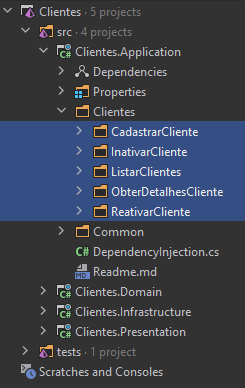
So the goal is to generate a diagram that reflects this structure. To do that, we’ll use a simple Python script.
Here’s what the script needs to do:
- Identify the second-level directories
- Build the DSL describing each of them as a Use Case
- Request the diagram generation
- Download the image in the desired format
The first step is very specific to this example, so I won’t go into detail, but you can check it out in the full script at the end of the article.
In the second step, we build the DSL treating each folder as a use case:
def build_usecase_dsl_for_directories_in(usecase_directories, user_name) -> str:
  per_folder_uc = [
      f'[{user_name}]-({os.path.basename(directory)})'
      for directory in usecase_directories
  ]
  return ','.join(per_folder_uc)
The result of this operation will be something like [Usuario]-(CasoUso1),[Usuario]-(CasoUso2).... Here, each pair identifies a relationship.
In the next step, we can send a request to yUML to generate our diagram:
def request_usecase_diagram(usecase_dsl) -> str:
  r = requests.post(
      f'https://yuml.me/diagram/scruffy/usecase/',
      { "dsl_text": usecase_dsl }
  )
  svg_file_name = r.text
  return svg_file_name
This operation returns our diagram’s unique name on yUML. The file name comes with the .svg extension by default.
It’s worth noting that for use case and class diagrams, there are three different visual styles to choose from. The “scruffy” in the URL above is the cutest one, but there’s also “plain” and “boring”.
Finally, we can download the same diagram as .png, .jpg, and .pdf.
def download_diagrams_to(target_dir, svg_file_name, desired_extensions):
  if not os.path.exists(target_dir):
      os.mkdir(target_dir)

  for extension in desired_extensions:
      file_name = svg_file_name.replace('.svg', extension)

      diagram_url = f'https://yuml.me/{file_name}' # that alone identifies the file :)
      print('Downloading file', diagram_url)

      r = requests.get(diagram_url)
      file_path = os.path.join(target_dir, f'usecase{extension}')
      with open(file_path, 'wb') as output:
          output.write(r.content)
          output.flush()
      print('Saved file', file_path)
Below is the final version of the script. It’s not pretty code, and it wasn’t built for production, but it’s perfectly fine to plug into a CI pipeline that would update the diagram on every new deploy. If new features are added to the application, the diagram will include them, and at least that part of the documentation will stay up to date.
import os
import requests
import sys
import glob

def get_usecase_directories_in(parent_dir):
  second_level_directories = glob.glob(f'{parent_dir}/*/*')
  second_level_directories = list(filter(lambda f: os.path.isdir(f), second_level_directories))

  usecase_directories = []
  for directory in second_level_directories:
      skip = False
      for directory_to_exclude in ['bin', 'obj', 'Common', 'Properties']:
          if (directory_to_exclude in directory):
              skip = True
              continue
      if skip:
          continue

      usecase_directories.append(directory)

  return usecase_directories

def build_usecase_dsl_for_directories_in(usecase_directories, user_name) -> str:
  per_folder_uc = [
      f'[{user_name}]-({os.path.basename(directory)})'
      for directory in usecase_directories
  ]
  return ','.join(per_folder_uc)

def request_usecase_diagram(usecase_dsl) -> str:
  print('Requesting diagram generation...')
  r = requests.post(
      f'https://yuml.me/diagram/scruffy/usecase/',
      { "dsl_text": usecase_dsl }
  )
  svg_file_name = r.text
  print(f'Generated diagram: {svg_file_name}')
  return svg_file_name

def download_diagrams_to(target_dir, svg_file_name, desired_extensions):
  if not os.path.exists(target_dir):
      os.mkdir(target_dir)

  for extension in desired_extensions:
      file_name = svg_file_name.replace('.svg', extension)
      diagram_url = f'https://yuml.me/{file_name}'

      print(f'Downloading {diagram_url}...')
      r = requests.get(diagram_url)

      file_path = os.path.join(target_dir, f'usecase{extension}')
      with open(file_path, 'wb') as output:
          output.write(r.content)
          output.flush()
      print(f'Saved: {file_path}')

def main():
  if len(sys.argv) < 2:
      print('Usage: python generate_usecase_diagram.py <project_path>')
      sys.exit(1)

  project_path = sys.argv[1]
  user_name = 'Usuario'
  target_dir = './diagrams'
  extensions = ['.png', '.jpg', '.pdf']

  # Find use case directories
  usecase_dirs = get_usecase_directories_in(project_path)

  if not usecase_dirs:
      print('No use case directories found!')
      sys.exit(1)

  print(f'Found {len(usecase_dirs)} use case directories')

  # Generate the DSL
  dsl = build_usecase_dsl_for_directories_in(usecase_dirs, user_name)
  print(f'Generated DSL: {dsl}')

  # Generate the diagram
  svg_file = request_usecase_diagram(dsl)

  # Download in different formats
  download_diagrams_to(target_dir, svg_file, extensions)

  print('Done!')

if __name__ == '__main__':
  main()
Conclusion
yUML is an interesting tool for generating UML diagrams programmatically. While it isn’t the most robust tool on the market, it works very well for automated documentation and simple diagrams.
The main advantage of this approach is that the documentation can always be kept up to date through automation. Every time the project structure changes, the diagram can be regenerated automatically.
Some ideas for taking this approach further:
- Integrate it into the CI/CD pipeline
- Generate different kinds of diagrams based on the code structure
- Combine it with other code analysis tools
- Build dashboards with multiple diagrams
The script shown here is just a simple example, but it demonstrates how you can efficiently automate the generation of visual documentation.