
Semantic versioning made simple with MinVer
In this article, I show how to use MinVer to version .NET project assemblies. To illustrate, I walk through how I set up the release flow of my open-source library ForeverFactory with MinVer-based versioning.
MinVer is an extremely useful tool that makes semantic versioning of .NET assemblies easy using Git tags.
Semantic versioning, according to SemVer 2.0.0, follows this structure: [Major].[Minor].[Patch]. In short:
- When Major goes up, it means there was a big change, with a possible break in compatibility with previous versions
- When Minor goes up, it means functionality was added without breaking compatibility
- When Patch goes up, it means fixes or improvements
Semantic versioning done wrong
Traditionally, the way we control an assembly’s version is through the <PackageVersion>1.2.3</PackageVersion> tag in a project’s .csproj file (or in AssemblyInfo.cs files in older projects).
In the <PackageVersion>1.2.3</PackageVersion> example, we’re using a version hard-coded in the code:
[Hard Coded].[Hard Coded].[Hard Coded]
1.2.3
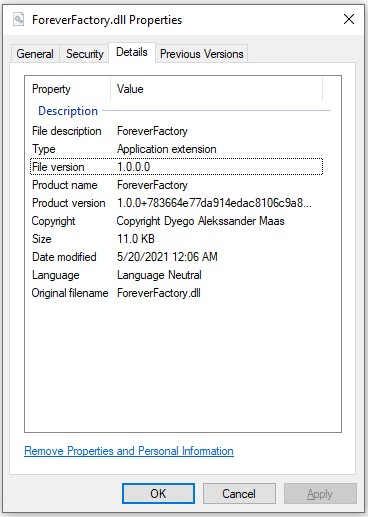
But if this is always done by hand, chances are high we’ll forget to bump the version in some of the project’s assemblies, and those assemblies will be compiled with the wrong version, or even stay at version 1.0.0 forever:
A very common and easy-to-implement alternative is to set Major and Minor by hand and bump Patch according to the continuous integration pipeline’s build number:
[Hard Coded].[Hard Coded].[CI Build Number]
1.2.64 (the pipeline has run 64x)
This process may work early in a project, but it isn’t sustainable in the long run. The main reason is that you can’t easily identify the program’s version from the Git commit tree.
That’s where Git tags come in. With them, it’s easy to tell which version a piece of software is at:
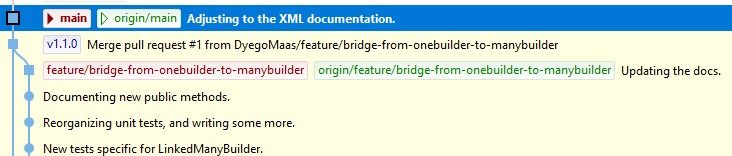
There’s still the risk that Git tags don’t reflect the assembly version in the commits they point to. A simple example would be a commit tagged 1.2.0 where the project version in the code is still 1.0.0. If we build the code from that exact commit, the assembly version will be 1.0.0, not 1.2.0 as we’d expect from the version tag.
This is easy to fix with the help of MinVer.
How MinVer can help
First of all, MinVer is very simple to use. Just reference it in the project, and with no further configuration, the assembly version will be based on the latest version tag found in the Git history.
By default, MinVer uses the following settings, which satisfy the official versioning guidance for open-source .NET libraries:
| Property | Value |
|---|---|
AssemblyVersion | {MinVerMajor}.0.0.0 |
FileVersion | {MinVerMajor}.{MinVerMinor}.{MinVerPatch}.0 |
PackageVersion | {MinVerVersion} |
Version | {MinVerVersion} |
These settings can be freely edited in the project file.
MinVer CLI
There’s also a command-line interface that can help with some settings. To install it, just run the command below:
dotnet tool install --global minver-cli --version 2.5.0With the CLI installed, we can ask MinVer to calculate the next semantic version by specifying which part we want to increment: major, minor, or patch (the default).
For example, running minver --auto-increment minor --tag-prefix=v at the root of the ForeverFactory library repository, currently at version v1.1.0, gives us this output:
MinVer: Using { Commit: 3450a1e, Tag: 'v1.1.0', Version: 1.1.0, Height: 2 }.
MinVer: Calculated version 1.2.0-alpha.0.2.
1.2.0-alpha.0.2
I used the --tag-prefix=v parameter only because I decided to prefix all version tags with the character v, as in v1.1.0.
Looking at the result, it’s worth noting that besides the version incremented to 1.2.0, MinVer also adds a second part, alpha.0.2. Let’s break it down to understand what it means:
alphais the default pre-release phase. This value can be changed with the-d|--default-pre-release-phase <PHASE>parameter, where the phase can be something likealpha,beta,preview,rc, etc;- The second value,
0, indicates the range of pre-release versions published so far. This value only goes up after we publish a pre-release version; - The last value,
2, is a metric called height, calculated as the number of commits since the last release.
An important premise of MinVer is that version tagging happens before publishing. So the expectation is that the compiled version will be based on the most recent semantic version tag found in the Git history.
ForeverFactory’s versioning strategy
Right after finishing the first version of the ForeverFactory library, I published it on NuGet. Versioning was 100% manual, through the <PackageVersion> property.
But soon after, I ran into some problems and had to release a few fix versions. After half a dozen of them, it was clear that versioning this way wouldn’t be practical, nor would the process feel natural.
So I looked at the repository of MediatR, one of my favorite .NET libraries, to see how it handles versioning. That’s when I came across MinVer.
Using MinVer in the project
This is the easy part. Just add a NuGet reference to MinVer with the dotnet add package MinVer command.
Once that’s done, to make sure MinVer works correctly, it’s important to check in the .csproj file that the reference includes the PrivateAssets="All" property. It should look like this:
<PackageReference Include="MinVer" Version="2.5.0">
  <PrivateAssets>all</PrivateAssets>
  <IncludeAssets>runtime; build; native; contentfiles; analyzers; buildtransitive</IncludeAssets>
</PackageReference>
From then on, MinVer takes care of running a process known as assembly patching, and every build will use the version from the latest version tag. As simple as that.
Note: if there are no tags at all, the version will probably be 0.0.0-alpha.0.
In my case, since I was already tagging versions with the v prefix, I also added the <MinVerTagPrefix>v</MinVerTagPrefix> property to the project properties so MinVer would pick up my version tags.
How to release based on tags
The versioning approach of the jbogard/MediatR repository is quite minimalist, and it was very easy to adopt.
If we look at the GitHub workflow below, we’ll see that the release process is triggered by pushing new version tags, which naturally follow the *.*.* pattern.
name: Release
on:
  push:
    tags:
    - '*.*.*'
jobs:
  release:
    strategy:
      fail-fast: false
    runs-on: ubuntu-latest
    steps:
      - uses: actions/checkout@v2
      - name: Setup dotnet 5.0
        uses: actions/setup-dotnet@v1
        with:
          dotnet-version: 5.0.x
      - name: Clean
        run: dotnet clean -c Release
      - name: Build
        run: dotnet build -c Release
      - name: Test
        run: dotnet test -c Release -r nuget-package --no-build -l trx --verbosity=normal
      - name: Pack
        run: dotnet pack src/ForeverFactory/ForeverFactory.csproj -c Release --no-build -o nuget-package
      - name: Publish to Nuget.org
        run: dotnet nuget push nuget-package/*.nupkg -k ${{ secrets.NUGET_API_KEY }} -s https://api.nuget.org/v3/index.json
So when it’s time to release a new version, all I have to do is add a version tag to the chosen commit, and the magic happens: the library is compiled, tested, packaged, and published to NuGet with the version from the tag that triggered the pipeline.
You can check out the result on NuGet at this link.
Final thoughts
MinVer is perfect for small projects and small teams. It removes all the bureaucracy involved in versioning a project, while helping us follow semantic versioning best practices.
But for more complex workflows, larger products, and big teams with multiple squads, it’s more appropriate to consider more robust tools, such as GitVersion.
I hope this post proves useful to you. For me, it’s already working, and it has brought simplicity and consistency to the library’s versioning. I’ll certainly use this same flow in future projects too.