Speeding up the creation of applications and services with Replicante
In this article, I take a detailed look at Replicante, a completely technology-agnostic template processor for software projects.
In this article, I want to introduce a new tool that makes it easier to generate projects from templates: a template processor called Replicante. My first open-source project.
In the paragraphs below, I’ll try to explain what drove me to build this project, and how it can make life easier on some mundane tasks that end up eating our time.
CTRL+C, CTRL+V Plus
Every now and then we have to start a new software project. And it’s often exciting: it’s a chance to do things differently, to try new approaches, new tools and technologies.
But sometimes the new project looks a lot like one we built in the past, and using that one as a template is tempting. Just a CTRL+C and a CTRL+V, a few find-and-replaces, and then delete whatever doesn’t matter for the new project.
Lots of people do this, and I’ve done it myself countless times. And even if you create a template project, doing this copy process by hand is tedious, laborious, and error-prone.
Recognizing that this is a recurring pattern in the software world, even if rarely talked about, I started wondering whether it would be possible to automate the steps of this process and make it almost trivial.
Automating template transformation
Imagine you work at an agency that builds websites and other software projects. You want every project to be unique, but you have bills to pay. So you want to reuse as much work as possible from previous projects.
A very likely approach would be to keep a very complete, fully customizable boilerplate on hand, and base every new project on it. A freelancer’s situation isn’t much different.
Every stack has its own tools for generating projects. NodeJS, Ruby, Python, Go, C#, Java. Each one works its own way.
But what if we could build a template project, in any technology, and use an external tool to generate our projects?
What if that tool were easy to use?
What if it were easy to plug into our continuous integration pipelines?
Replicante
And that’s how Replicante came about: an easy-to-use template processor that runs right in your terminal.
One of the project’s initial goals was that it should work entirely through configuration. The process had to be declarative.
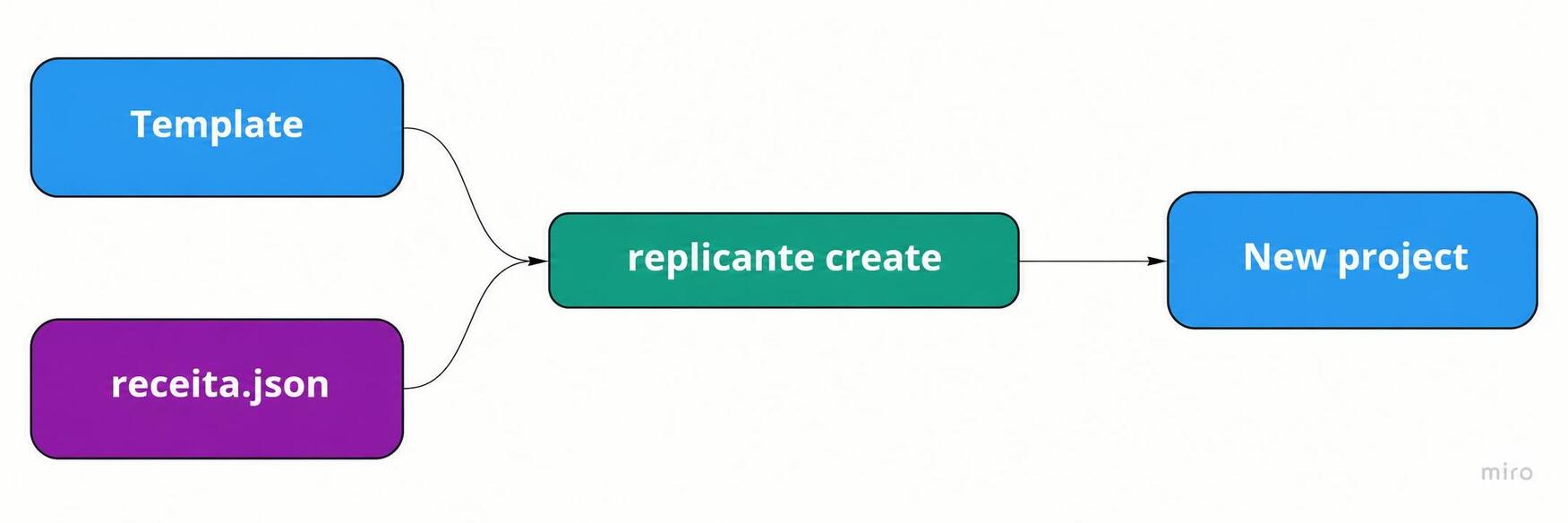
That’s why every replication process starts with a template project and a recipe like this one:
{
"replicantName": "NovoSuperProjeto",
"fileNameReplacements": [],
"sourceCodeReplacements": []
}
As we can see, the new project is called a replicant, and it has a name. We also have two other collections: replacements in file names, and replacements in source code.
Each of them is fed with elements that describe replacement rules, like this one:
{ "from": "TermoOriginal", "to": "NovoTermo" }The rules defined in the fileNameReplacements collection affect file and folder names. Let’s look at a simple example: say our template has a folder called ClienteX (“ClientX”), which works as the namespace for all the source files inside it. In a C# project, it would look something like this:
`ClienteX
|---Services
|---Controllers
|---...
And on top of that, every .cs source file inside the client folder includes the directory in its namespace, like this:
public namespace ClienteX.Services
{
  public class MeuServico{...}
}
If we want every new project to use the client’s name as its namespace, we just set up the following configuration and voilà:
{
"replicantName": "NovoSuperProjeto",
"fileNameReplacements": [
    { "from": "ClienteX", "to": "BurgerKing" }
],
"sourceCodeReplacements": [
    { "from": "ClienteX", "to": "BurgerKing" }
]
}
Applying this recipe produces the following:
`BurguerKing
|---Services
|---Controllers
|---...
public namespace BurguerKing.Services
{
  public class MeuServico {...}
}
The tool itself is a command-line app built with a mix of JavaScript and TypeScript using a toolkit called Gluegun. You can check out my previous article where I talk about what it was like to build Replicante with Gluegun.
Using it is very simple:
replicante create \
c:/projects/template \ # path to the template folder
c:/receitas/receita-bk.json \ # path to the recipe
--target=c:/projects/bk # target path, where the project will be generated
Gluegun
The Replicante CLI was built with a toolkit called Gluegun. You can read my article on how Replicante was built with this tool at this link.
A playful example: Humanizer -> Martianizer
How about a more eccentric example? Say the authors of the Humanizer library (an excellent library, by the way) woke up one day with the brilliant idea of renaming it Martianizer (with our Martian friends in mind).
That means every API would have to be adjusted, and the projects renamed. In this library, the term Humanize is everywhere: in methods, class names, namespaces, file names, the project, the solution and configuration files.
using System;
using System.Collections.Generic;
using Humanizer.Configuration;

namespace Humanizer
{
  /// <summary>
  /// Humanizes an IEnumerable into a human readable list
  /// </summary>
  public static class CollectionHumanizeExtensions
  {
      /// <summary>
      /// Formats the collection for display, calling ToString() on each object and
      /// using the default separator for the current culture.
      /// </summary>
      public static string Humanize<T>(this IEnumerable<T> collection)
      {
          return Configurator.CollectionFormatter.Humanize(collection);
      }

      //...
To turn this project into Martianizer, all it would take is applying the following recipe:
{
"replicantName": "Martianizer",
"templateName": "martianizr-generator",
"fileNameReplacements": [
  { "from": "Human", "to": "Martian" }
],
"sourceCodeReplacements": [
  { "from": "HUMAN", "to": "MARTIAN" },
  { "from": "Human", "to": "Martian" },
  { "from": "human", "to": "martian" }
]
}
These few replacements cover every occurrence in the repository of terms like humanize, humanizing, humanizer, humanization, dehumanization, humanized and Humanizr. And the results are very promising. The project comes out right from the start, compiling, and “martianized”:
using System;
using System.Collections.Generic;
using Martianizer.Configuration;

namespace Martianizer
{
  /// <summary>
  /// Martianizes an IEnumerable into a human readable list
  /// </summary>
  public static class CollectionMartianizeExtensions
  {
      /// <summary>
      /// Formats the collection for display, calling ToString() on each object and
      /// using the default separator for the current culture.
      /// </summary>
      public static string Martianize<T>(this IEnumerable<T> collection)
      {
          return Configurator.CollectionFormatter.Martianize(collection);
      }

      //...
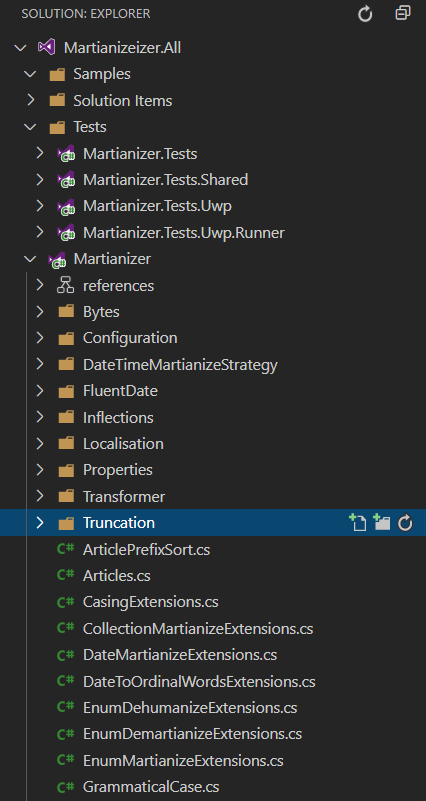
And the file tree comes out right, with every transformation applied:
Common kinds of adjustments
There are many situations and file types we need to adjust to turn a template into a new project, such as:
- Source files
- Configuration files
- CI/CD pipeline files
All of these cases can benefit from these replacement rules.
Template processing
Replicante processes templates in two stages, as the following diagram shows:
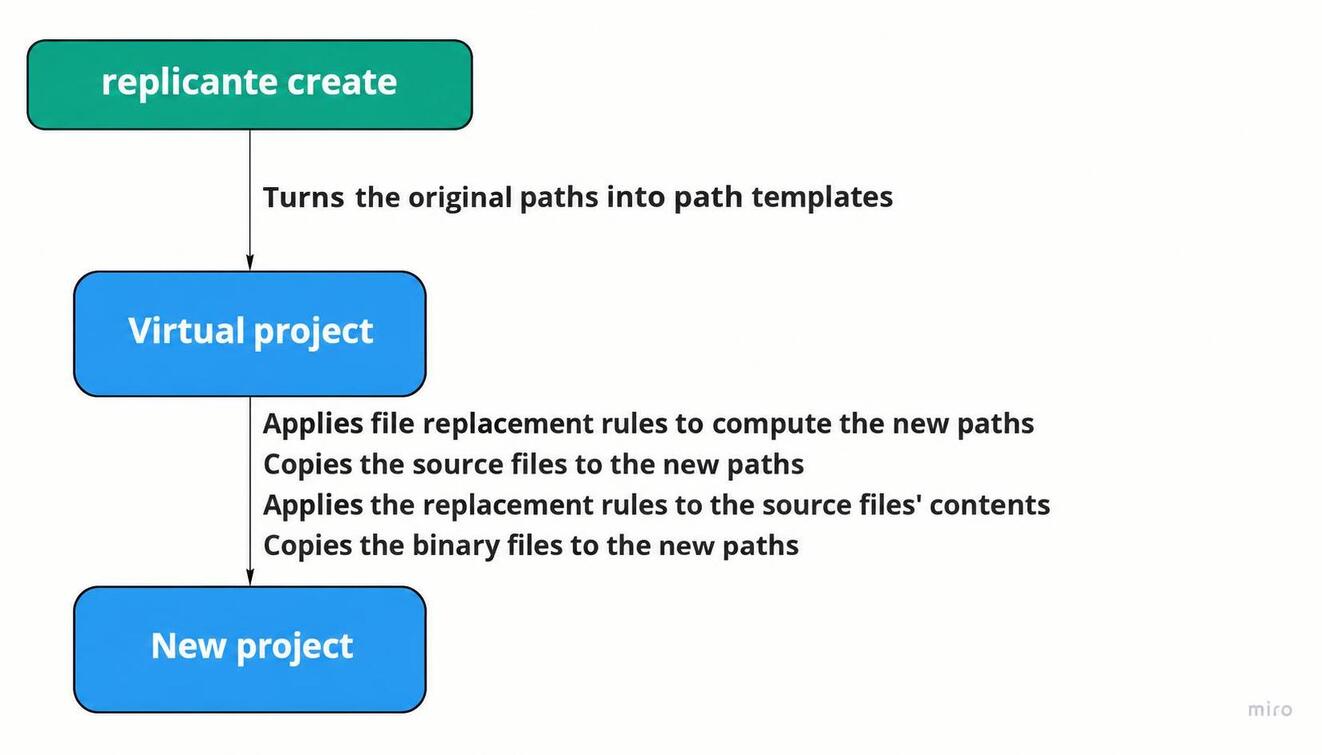
In the first stage, it generates a virtual project in which each file’s path is turned into a template for later processing, as in the following example:
ClienteX/Services/MeuServico -> BurgerKing/Services/MeuServico
This step may look unnecessary at first glance, but it makes room for more advanced features, such as using variables in the template.
For example, the replicant’s name is exposed as a <<: name :>> variable, and can be used like this:
{
"replicantName": "BurgerKing",
"fileNameReplacements": [
    { "from": "ClienteX", "to": "<<: name :>>" }
],
"sourceCodeReplacements": [
    { "from": "ClienteX", "to": "<<: name :>>" }
]
}
Besides the <<: name :>> variable, there are other variations too, such as nameLower, nameUpper, and others.
For now, these are the only supported variables, but others may be added in the future, such as dates.
Finally, in the second stage, these variables are replaced by their final values, so the files can be copied to their final destination.
Once copied, the content replacement rules are applied to those files.
Finally, the static files are copied over.
Any project is a template
Given how Replicante works, creating a template may not even be necessary.
An alternative becomes copying a previous project, probably the one closest to what we want to build, and modifying it from there. In other words, any project can serve as a template.
All you need is to figure out which terms need adjusting, write a recipe, and apply it.
Living templates
One approach this makes easy to adopt is creating a template application. That application can then serve as the base for creating others.
But it’s more than just a template: it’s what I call a living template, with all the automated tests it needs, sample implementations of the main features, a CI/CD pipeline, static code analysis with tools like SonarQube, and documentation.
By now it’s clear that any application can serve as a living template, but building an application solely for that purpose may be a good idea. It all depends on the scenario.
Wrapping up
Replicante can be installed via NPM with npm i -g replicante, and the help command will walk you through the process.
Building this tool taught me a lot, including the humility to admit that sometimes we really do these shameless CTRL+C, CTRL+Vs to save time.
I’ve already plugged Replicante into an Azure DevOps pipeline to generate new microservices from a Clean Architecture template, and it works beautifully.